

Create

One video template. Unlimited personalized video journeys

Think beyond MP4

Designing and animating in Adobe After Effects with the Blings extension lets you export compositions to the Blings studio, where layers can be connected to data. This turns the video into a “live” and editable format, much like how web designers handle dynamic content compared to traditional designers.
Learn More
A digital interface displays features like animation tools: a pink basketball video, a graph editor, a timeline with keyframes, and various editing controls, representing animation or motion graphics software.
Eyal Padan
Eyal Padan
CMO
McDonald's

“Blings has revolutionized our CRM communications with engaging, gamified video content that elevates the user journey and delivers tangible results—more app downloads, increased user registrations, and higher sales.”

4.2x
Increased sales
6.8x
Instagram follows
83%
Engagement increase
group 1430105308 1

Adobe AE

Design and animate your video using After Effects to create high-quality visual content

group 1430105310 1

Blings extension

Build your compositions into the MP5 format with the Blings Extension, preparing them for dynamic use

group 1430105311 1

Blings studio

Connect your video layers to data and turn them into interactive experiences with a no-code tool

Revolutionizing video creation

Blings Extension
+ Studio

Export your compositions from After Effects with the Blings Extension. A JSON file is pulled into Blings Studio, our no-code tool, where all your layers become live.

Learn More

blings extension studio 1

Define Data

Define variables that match your CRM tokens for precise data integration. This approach ensures that Blings manages data securely, without exposing any user information.

Learn More

A Blings platform dialog headed Create variable, with fields for name and type, illustrating how data variables are defined.

Connect Layers

Link each video layer—whether text, image, color, or video—to relevant data points for tailored, dynamic content.

Learn More

A personalized video frame addressed to Hey name, with a layered burger composition, a 20 percent off label, and color swatches, illustrating how dynamic layers are connected.

Interactivity

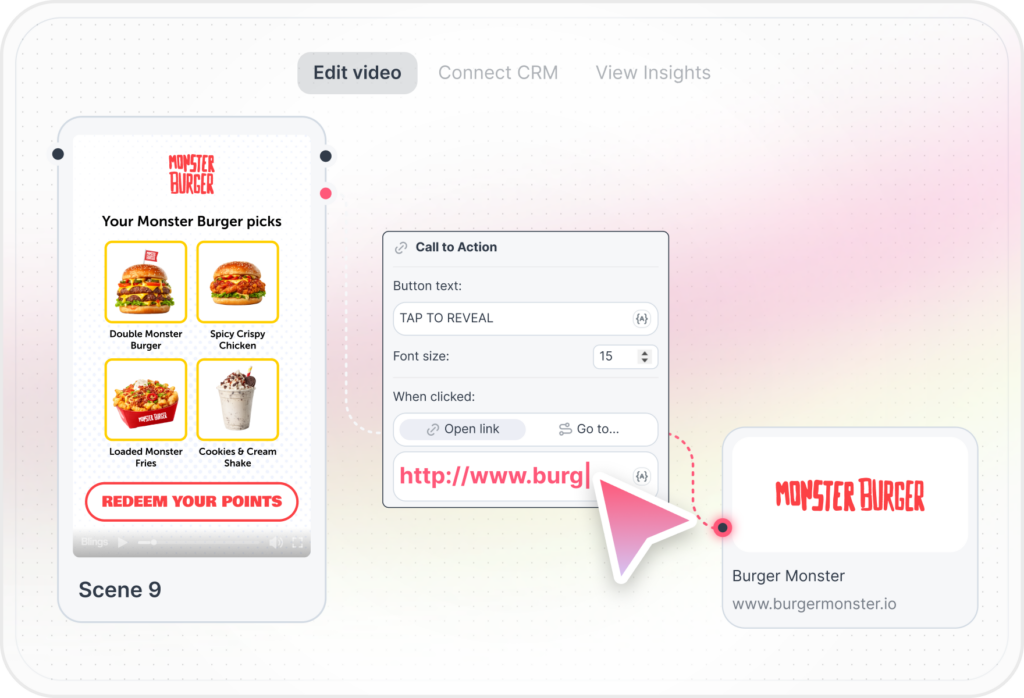
Set up interactive elements to determine where user clicks will lead, whether it’s exploring within the video or redirecting to an external link.

Learn More

A Blings editor view of a personalized video frame for a burger campaign, with a scene panel and a clickable link, illustrating interactivity.

Business Logic

Create dynamic scenes that adapt based on user data or behavior, delivering personalized sequences to different viewers

Learn More

business logic 1

AI tools

Your customers are waiting for great video experiences.

Start creating for free