Best Practices

Best practices for embedding video in email campaigns

Yonatan Schreiber's avatar Yonatan Schreiber | Jul 10, 2026
best practices for embedding video in email campaigns
Yonatan Schreiber's avatar Yonatan Schreiber | Jul 10, 2026

Every email marketing team eventually arrives at the same question. The brand has a great video. The campaign would benefit from putting that video in front of the subscriber. The simplest impulse is to embed the file. The simplest impulse is also the wrong one. Embedding an MP4 inside a marketing email creates problems on every dimension that actually matters: deliverability, file size, client compatibility, mobile rendering, analytics, and personalization. The right pattern is to link to a custom URL backed by MP5 technology, which solves each of those problems at the architecture layer rather than in the email itself.

This piece walks through why embedding MP4 in email is structurally broken, what specifically breaks for which clients, and how the link-to-Live-URL pattern produces measurably better outcomes. The argument applies to every category of campaign: lifecycle, lifecycle, referral, retention, onboarding, transactional. The architecture choice determines the outcome.

Why is embedding an MP4 in an email a bad idea?

Embedding an MP4 directly inside an email body fails for six concrete reasons. Each reason on its own is enough to justify a different approach. Combined, they make the pattern indefensible at scale.

Email clients do not consistently support inline video playback. Apple Mail supports HTML5 video tags on macOS and iOS in some configurations. Outlook on Windows and Outlook for the web do not. Gmail does not render HTML5 video natively. Yahoo Mail does not. Most enterprise email clients sandbox or strip the video tag entirely. The result is that any video tag in a marketing email is, in practice, a fallback exercise for the majority of inboxes.

File size kills deliverability. A 30-second 1080p MP4 typically weighs 8 to 15 megabytes. Most email service providers (ESPs) including Mailchimp, Klaviyo, Iterable, and Braze either reject messages with attached video or strip the attachment before send. Gmail caps the total message size at 25 megabytes, and the rest of the message has to fit inside that envelope. Even where the message squeezes through, large attachments push the message toward spam filters because attachment size is a signal that gateways watch.

Mobile clients struggle with embedded video. Most subscribers open marketing email on mobile, and mobile clients have inconsistent codec support, autoplay restrictions, and battery-driven playback controls that make the inline experience unreliable. The video may load slowly, fail to autoplay, or render a broken thumbnail. Each of these is a worse outcome than a clean thumbnail with a clear call to action.

Analytics are blind. An embedded MP4 inside an email gives the marketer no signal about who watched, how long, or where they dropped off. The video plays or it does not. There is no event stream back to the ESP. There is no way to trigger a follow-up workflow based on completion. The personalization layer downstream has nothing to consume.

Personalization is structurally impossible. A pre-rendered MP4 attached to an email is the same file for every recipient. The only way to personalize it is to render a separate file per subscriber, which inflates storage costs, breaks ESP attachment limits, and creates a render queue that decouples the data from the send. By the time the per-recipient render is ready, the behavioral trigger that justified the campaign has expired.

Updates require resends. If anything in the video needs to change after send (a date correction, a price update, a copy fix), the only options are to send a follow-up email or to live with the error. The file in the recipient’s inbox cannot be updated.

For a deeper architectural treatment of why static MP4 fails the modern marketing stack, see MP4 is dead: long live the MP5.

What is the alternative to embedding an MP4?

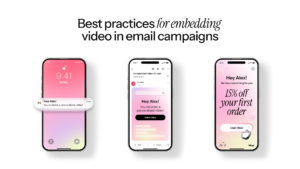
The pattern that works is simple: embed a thumbnail image with a play button overlay inside the email, and link the thumbnail to a custom URL that opens the video in the recipient’s browser. The thumbnail is lightweight, renders consistently across every email client, and creates the visual cue that the link is a video rather than a generic destination. The custom URL is where the actual video lives, generated on demand at the moment of click.

For Blings customers, that custom URL is backed by MP5 technology, our patented client-side rendering architecture. The video is not a pre-rendered file. It is a Dynamic Master Template that resolves on the recipient’s device using the personalization variables passed through the URL. The recipient experiences a one-to-one video that reflects their name, their tier, their history, and any other field the brand wants to express. The marketer experiences a single template that serves an unlimited audience.

The pattern works because it separates the rendering decision from the email send. The email is a static, lightweight, deliverable asset that gets to the inbox cleanly. The video is a dynamic, client-side experience that opens in the browser where the architecture is permissive. The handoff between the two happens at the click, which is exactly where engagement signal becomes useful for the downstream marketing automation.

What does the thumbnail-and-link pattern look like in practice?

The implementation is straightforward. The email body contains an image that visually communicates “this is a video” through a play button overlay, a high-contrast still frame, and surrounding copy that sets context. The image is wrapped in an anchor tag pointing to the custom URL. The URL itself carries the personalization parameters as query strings or path variables, depending on how the campaign is configured.

The thumbnail can be a static JPG or PNG, or an animated GIF that loops a short snippet of the video to telegraph movement. Animated GIFs render in Apple Mail, Gmail, Yahoo Mail, and most mobile clients, with Outlook on Windows showing the first frame only. For most campaigns the static thumbnail is enough. The GIF preview is a useful upgrade for campaigns where the visual hook drives the click.

The play button overlay is a small but important detail. According to Litmus research on email engagement, emails with a play button overlay on the video thumbnail produce a 12% to 21% lift in click-through rate compared to plain image thumbnails. The cue tells the subscriber what to expect on the other side of the click, which reduces hesitation and increases the probability of action.

How does the custom URL handle deliverability and rendering?

The custom URL pattern moves the rendering step out of the email and into the browser. That move solves the deliverability problem because the email itself is now lightweight: an HTML body with images, no attachments, no embedded video tag, no oversized payload. The message slips through ESP rules and inbox provider gateways the way any other marketing email does.

On the rendering side, the custom URL hits Blings infrastructure, which serves the Dynamic Master Template. The personalization variables in the URL resolve on the recipient’s device using MP5 technology. The video renders in real time, reflecting the current state of every variable. If the campaign data has changed between send and click (a tier upgrade, a name correction, a new reward balance), the video reflects the current state, not the state at send.

The architecture is also kind to mobile. The video plays in the device’s native browser using codec paths that mobile platforms support reliably. Autoplay is governed by the user’s gesture (the click on the thumbnail), which satisfies mobile autoplay restrictions and produces a clean playback experience.

What analytics does the custom URL produce that an embedded MP4 cannot?

The analytics gap is one of the strongest arguments for the link-to-Live-URL pattern. Every custom URL emits engagement events at the recipient level: open, play, watch milestones, completion, and CTA clicks. The events flow back to the customer record in the ESP or CRM through standard webhook patterns and native connectors. The data is available for segmentation, trigger automation, and revenue attribution.

For Blings customers integrated with Braze, Iterable, Klaviyo, HubSpot, or Salesforce, the events appear on the contact timeline alongside email opens, form submissions, and other behavioral signals. Marketing operators can build downstream workflows based on video engagement: send a follow-up sequence to subscribers who watched past the 50% mark, suppress the next message in the series for subscribers who completed the video, route highly engaged subscribers to a sales handoff. None of this is possible with an embedded MP4.

For a deeper look at how the integration produces measurable lift, see why Blings beats traditional video platforms for referral campaigns, which covers the loop between video engagement and downstream conversion in detail.

What are the best practices for the email itself?

The email that delivers the link to the custom URL has its own set of design considerations. The patterns below are the ones that consistently produce the highest click-through to the video, across the customer base we work with.

  • Lead with a clear visual hook. The thumbnail should communicate the value of clicking in less than a second of scan time. High-contrast subject, recognizable face, clear product framing.
  • Include the play button overlay. A simple triangle inside a translucent circle is enough. The cue lifts CTR by double-digit percentages in published benchmarks.
  • Use a concise headline. The headline above or below the thumbnail should set context in under 10 words. Subscribers decide in seconds.
  • Add a fallback link. Below the thumbnail, include a short text link to the same URL. Some subscribers prefer text links, and the redundancy is friendly to accessibility tooling.
  • Match the personalization in the email to the personalization in the video. If the email body uses the subscriber’s first name and tier, the video should too. The continuity between channels is what makes the experience feel deliberate.
  • Set expectations on length. A short line of copy near the thumbnail (“a 60-second tour”, “a one-minute year in review”) reduces drop-off on the destination page.
  • Use UTM parameters and custom URL analytics together. The ESP records the click, the custom URL records the watch behavior. Together they produce a complete picture of the funnel.

For a campaign-level treatment of the lifecycle implications, see optimizing your email marketing for better conversions.

What does the pattern look like in production?

The clearest production view comes from Live Nation VIP, which used the thumbnail-and-Live-URL pattern for the Trilogy Tour fan engagement campaign. Every VIP ticket holder received an email with a personalized video thumbnail and a link to a custom URL that rendered the personalized fan experience on click. The campaign produced a 17.55% lift in unique opens and 82 seconds of average watch time on a 40-second video, with a 16.6% share rate. Read the full breakdown in the Live Nation VIP case study.

The same pattern applies to lifecycle campaigns at brands like Vonage, retention programs at Habit Burger Grill, and localized loyalty work at McDonald’s. The thumbnail-and-link approach is not specific to any vertical. It is a structural choice that scales across categories because the architecture choice it depends on is the same one.

FAQ

Can I embed video in email using HTML5 video tags? You can technically include the tag, but the majority of email clients including Gmail, Outlook, and Yahoo Mail do not render it. The practical answer is no.

Will linking to a custom URL hurt my email engagement metrics? No. The click on the thumbnail registers as a normal email click, and the downstream video engagement events flow back to the ESP or CRM as custom events. The metrics are richer than what an embedded MP4 could ever produce.

What if my subscriber has a poor mobile connection? The custom URL pattern handles poor connections gracefully because the video renders on the device using a small set of parameters and lightweight assets, not a pre-rendered multi-megabyte file. Subscribers on slow connections experience a faster open than they would with a 10-megabyte attachment.

Does the URL work for transactional email? Yes. Transactional confirmations, shipping updates, and account changes benefit from the same architecture, and the personalization variables align naturally with transactional data.

How does Blings handle subscriber privacy in the URL? Blings uses a Zero-Knowledge Architecture, which means PII is resolved on the recipient’s device at the moment of open and is never persisted on Blings servers. The CRM remains the only source of truth for customer data.

The takeaway

Embedding MP4 in marketing email looks like the simple answer until you trace it through the deliverability, rendering, mobile, analytics, personalization, and update layers. Every one of those layers breaks in a meaningful way. The link-to-Live-URL pattern, backed by MP5 technology, fixes them all without trading anything off. The email gets to the inbox cleanly. The video opens reliably in the browser. The personalization is one-to-one. The analytics feed downstream automation. Updates happen at the URL, not the inbox.

The teams getting the strongest results from video in email are the ones that stopped trying to embed the file. They moved the rendering decision out of the inbox and into the browser, which is where the modern marketing stack was always designed to handle it. The architecture choice is the practice.

Talk with a video expert now to see what you can accomplish.
Schedule Call

Your customers are waiting for great video experiences.

Start creating for free