Best Practices

Emails that get clicked: subject lines, previews, and live video

Corrie's avatar Corrie | Mar 23, 2026
emails that get clicked 1
Corrie's avatar Corrie | Mar 23, 2026


Your customers open roughly 100 to 150 emails a week. Your campaign is one of them. If the subject line does not stop the scroll and the body experience does not deliver on its promise, your message is gone before it registers. In 2026, static content is not just underperforming; it is actively eroding trust.

This guide breaks down the mechanics of high-performing email campaigns, from the psychology of a great subject line to the infrastructure behind personalized video for email that updates itself at the exact moment a customer clicks open.


Emails that get clicks flow

Why most emails fail before they are even opened

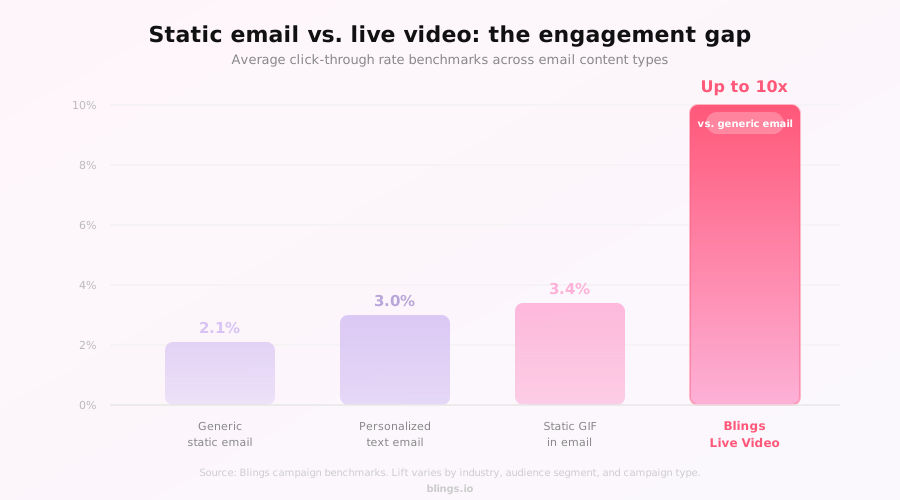
The average email click-through rate across industries sits between 2% and 5%. That number is not a performance ceiling; it is a symptom of the generic, render-once approach that still dominates most email programs. Three structural problems cause the bulk of disengagement:

Static subject lines that address no one in particular. Generic preview text that reinforces the sense of irrelevance. Visual content that lied at the time of open, showing an offer that expired yesterday or a name that belongs to someone else.

Fixing the first two is relatively straightforward. Fixing the third requires a different architectural approach to how video and dynamic content are delivered.

The hook: subject lines that demand attention

A great subject line does one thing: it creates the expectation of something relevant and personal. In 2026, that bar means going beyond first-name personalization. Customers expect brands to know their status, their history, and their moment. Subject lines that consistently outperform generic alternatives share these traits:

They name a specific outcome or piece of data the customer already owns: “Your loyalty balance just updated, [Name].” They signal that what is inside was made for this recipient specifically: “A video offer made just for you.” They create mild urgency rooted in the customer’s context, not manufactured scarcity: “Your [Tier] renewal window closes Friday.”

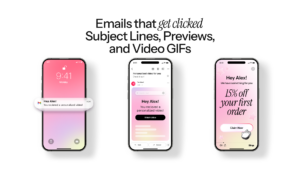
Preview text is the second hook. It is the sentence visible in the inbox before the email is opened. Treat it as a second subject line: extend the promise, add a specific data point, or hint at the visual experience waiting inside.

Blings recommendation: Pair a hyper-relevant subject line with preview text that references the customer’s specific data variable. For example: “See exactly how close you are to Gold status.” This two-line combination signals personalization before a single pixel of the email renders.


graphic2 blog1 ctr comparison

The visual power of live video

Traditional personalized video tools work by pre-rendering a unique video file for every recipient, then attaching a static snapshot or GIF to the email. By the time the customer opens it, that file is a historical artifact. It reflects data from the moment it was generated, not the moment it is viewed.

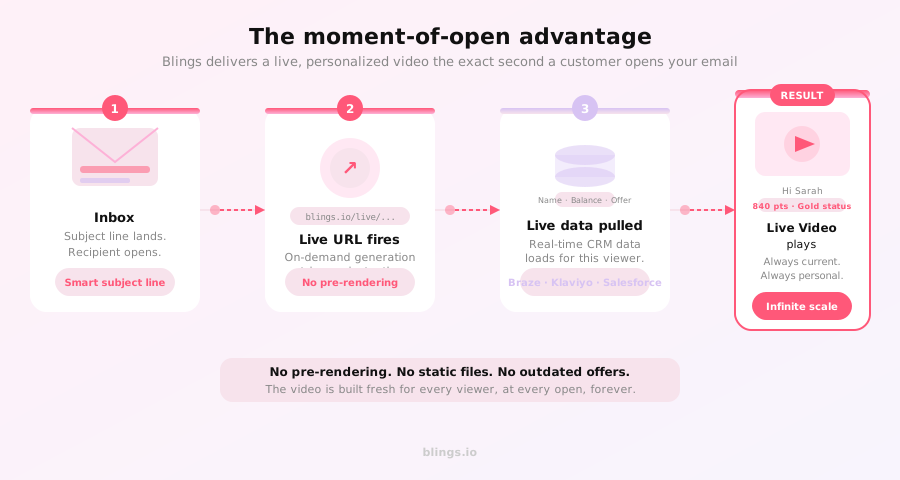
Blings delivers Live Video: a cinematic video experience that assembles itself on the customer’s device at the exact millisecond they open the email. This is the moment-of-open advantage. There is no pre-rendered file. There is no static snapshot. The video knows the customer’s current name and account status, their live loyalty balance or points total, the active offer in your CRM right now, and the time, date, and context of the open itself.

This is the difference between a video that was personalized and a video that is personalized.

Rather than attaching a file, Blings generates a Live URL for your campaign. This URL behaves like any other hyperlink in your email, but when a recipient’s device resolves it, it triggers on-demand video generation using that customer’s live data. The result is a full-motion, cinematic video that looks exactly like a premium brand asset, because it is one.

Build once, personalize forever

The most common objection from marketing teams is production volume. Traditional personalized video requires a separate render for every recipient, which means a campaign of 200,000 customers requires 200,000 renders: a production queue that takes hours or days and is outdated before it ships.

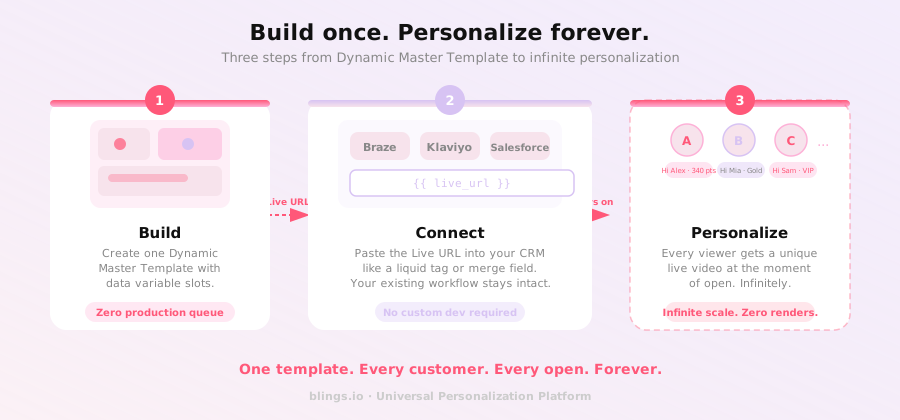
Blings eliminates this bottleneck entirely. Your team builds a single Dynamic Video Template once: the layout, the motion, the brand elements, the messaging structure. The template contains data variables instead of hard-coded values. Those variables connect to your CRM and resolve at the moment of open for each recipient.


graphic3 blog1 workflow


The workflow is straightforward. Build your Dynamic Video Template in the Blings platform. Receive a single Live URL for the campaign. Paste that URL into your existing CRM: Braze, Klaviyo, Salesforce, or any other platform, exactly as you would paste a liquid tag or merge field. The video personalizes itself for every recipient, infinitely, without any additional production work.

This is not a productivity gain. It is a structural change in how personalization scales. You produce once. The infrastructure personalizes forever.

CRM integration: no new tech stack required

One of the most persistent barriers to adopting personalized video is the assumption that it requires replacing or reworking your existing marketing technology. Blings is built to integrate with what you already have. The Live URL is a first-class citizen in any CRM that supports dynamic content fields.

Blings integrates directly with Braze, Klaviyo, Salesforce, HubSpot, and Adobe. You turn your raw customer data into live, cinematic journeys without touching your existing automation logic, your email templates, or your delivery infrastructure.

Data integrity note: Because Blings uses client-side architecture and on-demand generation, Blings never sees or stores your customer PII. The video assembles on the viewer’s device using their own data. This architecture is SOC 2 compliant by design, which matters when your legal and security teams review new vendor integrations.

What this means for your email performance

Customers who feel genuinely recognized engage more, spend more, and churn less. That is not a hypothesis; it is the behavioral pattern that emerges when you close the gap between what a customer expects and what they actually receive.

Live Video at the moment of open is the mechanism that closes that gap. The subject line creates the expectation. The Live URL delivers the proof. Together, they turn a routine retention email into a high-performance revenue touchpoint.

Frequently asked questions

What is a Live Video in email marketing?

A Live Video is a personalized video asset that assembles itself on the viewer’s device at the exact moment they open the email. Unlike a pre-rendered GIF or a static video snapshot, a Live Video reflects the customer’s real-time data, including their name, current loyalty balance, or the latest offer available at that millisecond. Blings is the infrastructure that powers Live Video delivery at scale.


How does the moment of open work with Blings?

Blings uses on-demand generation, meaning the video is not rendered in advance. When a recipient opens the email, the Live URL triggers video assembly on the customer’s device, pulling live data from your CRM at that precise moment. The result is a video that is always current, never outdated.


Do I need to rebuild my email workflow to use Blings?

No. You build a Dynamic Video Template once in Blings and receive a Live URL. You paste that URL into your existing CRM platform, such as Braze or Klaviyo, exactly like a liquid tag or a merge field. Your existing workflow stays intact; Blings handles the personalization layer.


Is Blings SOC 2 compliant?

Yes. Because Blings uses client-side architecture and on-demand generation, customer PII is never transmitted to or stored on Blings servers. The video assembles on the viewer’s device using their own data. This architecture is SOC 2 compliant by design.


What email platforms does Blings integrate with?

Blings integrates directly with Braze, Klaviyo, Salesforce, HubSpot, and Adobe. Integration requires pasting a Live URL into your existing campaign template. No custom development or third-party middleware is required.


Start sending emails that get clicked


The mechanics of a high-performing email campaign have not fundamentally changed: a compelling hook, a relevant experience, and a clear path to action. What has changed is your ability to deliver genuine personalization at the moment it matters most.


Blings gives you the infrastructure to make every email feel like it was written for one person. Build the template once. Connect it to your CRM. Let the moment of open do the rest.


Schedule your Blings Demo Now

See Blings in Action, For Free!
Get Started for Free