Personalization
Email

How to send personalized videos in Klaviyo

Yonatan Schreiber's avatar Yonatan Schreiber | Oct 23, 2026
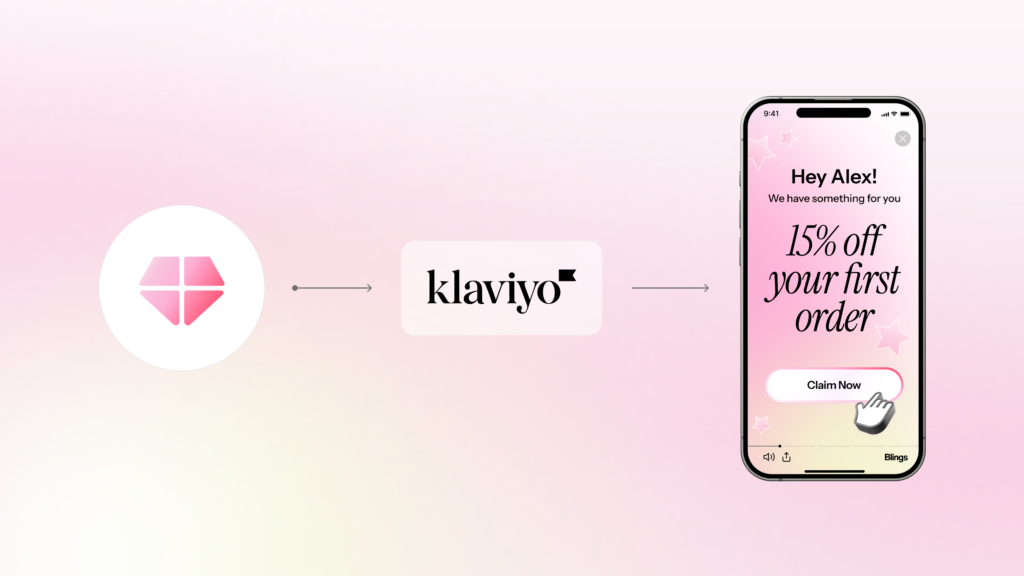
Blings and Klaviyo logos joined by a connector line, next to a phone playing a personalized video that greets Allen with a 15 percent first order offer.
Yonatan Schreiber's avatar Yonatan Schreiber | Oct 23, 2026

Klaviyo runs the e-commerce lifecycle for a huge share of online brands: the welcome flow, the browse-abandon series, the cart recovery, the post-purchase sequence, the win-back. Each of those flows is a moment where a personalized video would outperform a static image, and Klaviyo makes the delivery straightforward. This guide is a step-by-step walkthrough for sending personalized videos in Klaviyo, joining the same how-to series that covers Braze, HubSpot, and Salesforce.

The pattern is the same one that works across every major platform: a lightweight Smart Video Link (MP5) inside the Klaviyo email, with the personalization rendered on the customer’s device at the moment of open.
Why send personalized video through Klaviyo?

Klaviyo’s strength is the e-commerce lifecycle flow, and every flow has a moment that a personalized video makes stronger. A welcome flow that shows the customer a personalized introduction. A cart-recovery email that shows the exact items left behind. A post-purchase sequence that reflects what the customer just bought. A win-back that shows their history and a reason to return.

A Smart Video Link is a lightweight URL placed inside the Klaviyo email that opens a personalized video rendered on the customer’s device at the moment they tap it, rather than an embedded file. Because it is just a link, it keeps the email light and deliverable while carrying each customer’s personalization parameters.

The result is the personalization Klaviyo flows already aim for, now expressed as video rather than a static block. For why linking beats embedding, see the MP4 is dead.

What is MP5?

MP5 is a patented video format created by Blings. It is a lightweight, code-based format that assembles the personalized video on the recipient’s device at the moment of open, rather than shipping a heavy pre-rendered file, which is what makes the link-based Klaviyo delivery possible.

How do you send a personalized video in Klaviyo? Step by step

Here is the full workflow, from template to live flow.

  1. Build the workflow in Blings. Create one video template with data slots for the fields you want to personalize: first name, last purchase, cart items, loyalty status.
  2. Connect Klaviyo to Blings. Use the native integration so the Blings template can read the Klaviyo profile properties and event data.
  3. Map the personalization variables. Match each template slot to a Klaviyo profile property or event attribute, using Klaviyo’s standard variable syntax.
  4. Generate the Smart Video Link. The template produces a Live URL that carries each recipient’s parameters, resolved from their Klaviyo profile at send time.
  5. Add the video thumbnail to the Klaviyo email. Place a thumbnail image with a play button, linked to the Smart Video Link, inside the flow email.
  6. Drop it into the flow. Add the email to the welcome, cart-recovery, post-purchase, or win-back flow where the personalized video belongs.
  7. Render on demand. When the customer opens the email and taps the thumbnail, the video assembles on their device with their current Klaviyo data.
  8. Sync the engagement back. Video opens, watch milestones, and clicks flow back to Klaviyo as events, available for flow branching and segmentation.

On-demand rendering means the video assembles on the customer’s device at the moment of open, pulling current Klaviyo data, so the video is always accurate even if the customer’s cart or profile changed since the email was sent. For the architecture, see AI video personalization in 2026: why architecture matters more than the algorithm.

Which Klaviyo flows benefit most from personalized video?

The highest-leverage flows are the ones where recognition and specificity drive conversion:

  • Cart recovery: show the exact items left behind rather than describing them
  • Welcome flow: a personalized introduction that reflects the signup
  • Post-purchase: a confirmation and next-step video reflecting what the customer bought
  • Win-back: a dormant-customer video showing their history and a reason to return
  • Loyalty and VIP: a video showing the customer’s real points and available rewards

Each of these is a moment where a Blings Smart Video outperforms a static block, and the delivery through Klaviyo is the same lightweight-link pattern in every case. Habit Burger Grill built its loyalty personalization on exactly this recognition and lifted signups by 47%. See the Habit Burger Grill case study.

Does personalized video hurt Klaviyo email deliverability?

No. Because the personalized video is delivered as a Smart Video Link rather than an embedded file, the Klaviyo email stays lightweight and behaves like any email with a linked thumbnail. There is no oversized attachment to trip spam filters. In fact, the higher engagement that personalized video produces tends to improve sender reputation over time, which helps inbox placement. For the full breakdown, see the MP4 is dead.

FAQ

How do you send a personalized video in Klaviyo?

You build an MP5 in Blings, connect it to Klaviyo through the native integration, map the template slots to Klaviyo profile properties, generate a Smart Video Link, and place a linked thumbnail in your flow email. The video renders on the customer’s device at the moment of open with their current Klaviyo data.

What is a Smart Video Link?

A Smart Video Link is a lightweight URL inside the Klaviyo email that opens a personalized video rendered on the customer’s device at the moment they tap it, rather than an embedded file. It keeps the email light and carries each customer’s personalization parameters.

Which Klaviyo flows work best with personalized video?

Cart recovery, welcome, post-purchase, win-back, and loyalty flows benefit most, because they are the moments where recognition and specificity drive conversion. Cart recovery is often the highest-leverage starting point.

Does personalized video affect Klaviyo deliverability?

No. Delivered as a Smart Video Link rather than an embedded file, the email stays lightweight and behaves like any linked-thumbnail email. Higher engagement can improve sender reputation over time.

The takeaway

Klaviyo runs the e-commerce lifecycle, and every flow has a moment a personalized video makes stronger. Sending personalized video in Klaviyo is a straightforward pattern: build one Dynamic Master Template, connect it through the native integration, map the variables, and place a Smart Video Link in your flow. The video renders on the customer’s device at the moment of open, stays deliverable because it is a link, and syncs engagement back to Klaviyo for branching. This extends the same how-to approach that works in Braze, HubSpot, and Salesforce.

Start with cart recovery, where showing the exact items beats describing them, and expand to the welcome, post-purchase, and win-back flows from there.

Your customers are waiting for great video experiences.

Schedule a custom demo